
Catch every anomaly before it impacts payroll
Phoenix Raptor™ detects, analyzes, and flags workforce time variance in real time — across organizational units, locations, and pay periods. Stop reacting after payroll runs. Start controlling what changes before it does.
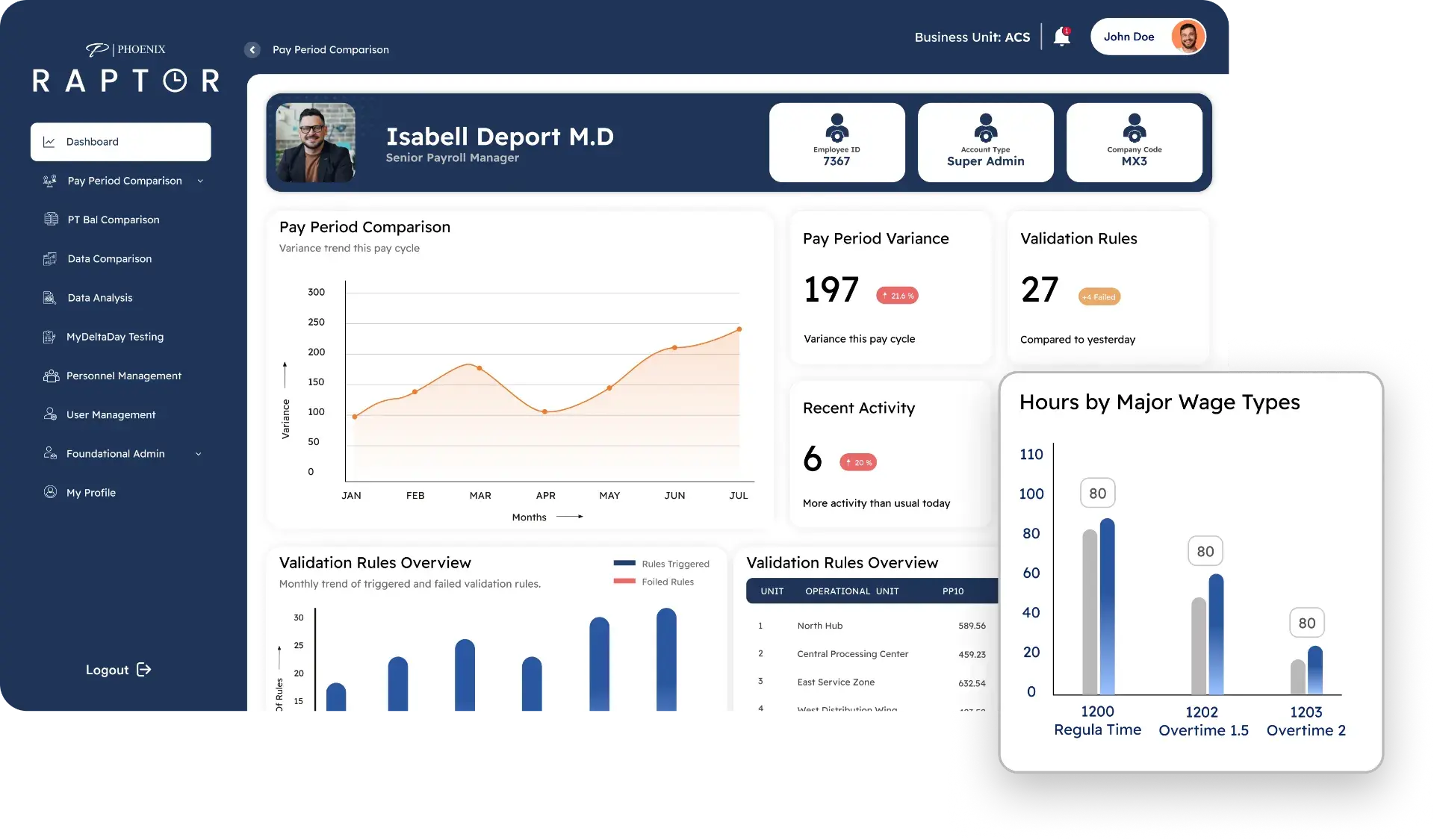
What Raptor catches
Comprehensive variance detection across time, workforce, and pay-period data — validated against your rules, not generic thresholds.
Time Variance & Workforce Anomalies
- Pay-period variance exceeding configurable thresholds — surfaced before processing
- Sudden shifts in total hours at organizational units or locations
- Overtime spikes relative to prior pay periods, flagged by severity
- Absence and leave-hour inconsistencies across consecutive periods
- Wage-type hour shifts that signal emerging workforce pattern changes
Data Consistency & Input Integrity
- Missing or inconsistent time records identified across pay-period boundaries
- Duplicate time entries isolated before they distort variance analysis
- Structural mismatches in organizational units, locations, and pay periods
- Late or incomplete submissions that compromise the comparison baseline
Validation Rule Triggers
- Custom rule breaches — hours exceeding thresholds, weekend anomalies, and more
- Department-level and employee-level rule violations flagged in real time
- Recurring anomaly patterns detected across multiple pay periods
- Threshold-based alerts on specific wage types routed to the appropriate reviewer
Variance Detection Radar
See variance before it moves money.
Continuous scanning across every workforce data point — flagging hour shifts, threshold breaches, and anomalies before payroll processes.
Amber nodes indicate flagged variances requiring review. Blue nodes represent validated, clean data.

Core capabilities
Automated Variance Detection
Pay-period comparison identifies hour shifts, overtime spikes, and workforce anomalies across organizational units and locations — before payroll processes.
Configurable Rule Engine
Define variance thresholds, weekend anomaly rules, wage-type limits, and employee-level triggers without code. Rules adapt to your policies across locations and pay structures.
Root Cause Tracing
Every flagged variance is traced to its origin — source system, data field, workforce structure change, or input error. The majority of anomalies are classified without manual investigation.
Trend Analysis & Pattern Detection
Aggregate variance data across pay periods to surface recurring anomalies, problematic organizational units, and systemic workforce data issues driving variance volume over time.
Auto-Resolution & Smart Alerts
Define rules for automatic handling of known low-risk variances. Threshold-based alerts on specific wage types and repeated patterns notify the right stakeholders instantly.
Pay Period Comparison Engine
Side-by-side pay-period analysis highlights shifts in total hours, headcount, overtime, and absence patterns — giving payroll teams a clear before-and-after view of workforce changes.
How variance management works
Five stages from detection to prevention — each resolved variance makes the system smarter.
Ingest
Phoenix ingests time and workforce data from all source systems continuously. Pay-period baselines are established automatically for comparison analysis.
Compare
Side-by-side pay-period comparison identifies hour shifts, headcount changes, overtime spikes, and absence-pattern deviations at every organizational level.
Flag
Variances exceeding configured thresholds are flagged with severity, root-cause classification, and affected scope — organizational unit, location, or employee.
Route
Flagged anomalies are routed to the appropriate reviewer based on type and severity. Auto-resolvable patterns are handled immediately with full audit trail.
Learn
Every resolution enriches the pattern library. Recurring anomalies trigger rule suggestions. Variance volume decreases as systemic data issues are eliminated.
Enterprise FAQs
How does Raptor detect time variances differently from our payroll system?
Most payroll systems flag errors after processing. Raptor compares workforce data across pay periods before payroll runs — catching hour shifts, overtime spikes, and structural anomalies at the source.
Can we define custom variance thresholds and rules?
Yes. The rules engine supports configurable thresholds per wage type, organizational unit, and location. Define weekend anomaly rules, overtime limits, and employee-level triggers without code.
What types of workforce anomalies does Raptor surface?
Sudden shifts in total hours at the organizational unit or location level, overtime spikes relative to prior periods, absence and leave-hour inconsistencies, wage-type hour shifts, and repeated anomaly patterns across pay periods.
How does Raptor handle data consistency issues?
Raptor validates input integrity by flagging missing or inconsistent time records, duplicate entries, structural mismatches in organizational units and locations, and late or incomplete data affecting comparison baselines.
Stop chasing variances. Start preventing them.
See how Phoenix Raptor™ maps to your current payroll operations and variance management workflows.